Preview
Documentation
Update 1.2: VAT Refactoring
The original vertex-based VAT path requires a separate high-bandwidth bake for each mesh-animation pair.
That becomes wasteful once many character meshes share the same skeleton animation set.
I extended SideFX Labs VAT 3.0 with a Skeleton Mode path, so animation data is no longer tied directly to one mesh.
The bake stays at bone-count scale and can be reused by characters that share the same skeleton.
Update 1.1: Python Import Pipeline
The Challenge
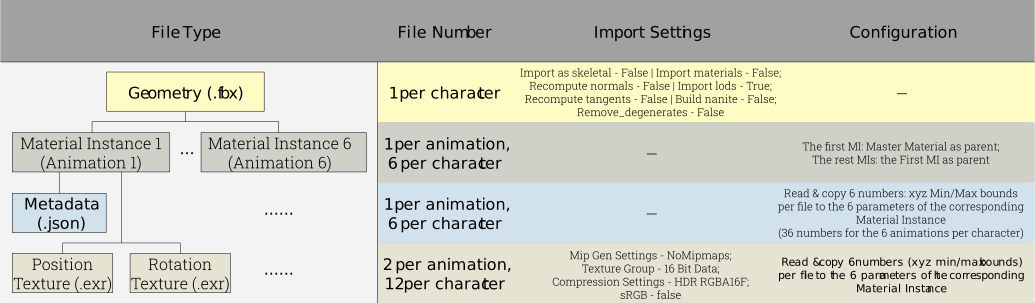
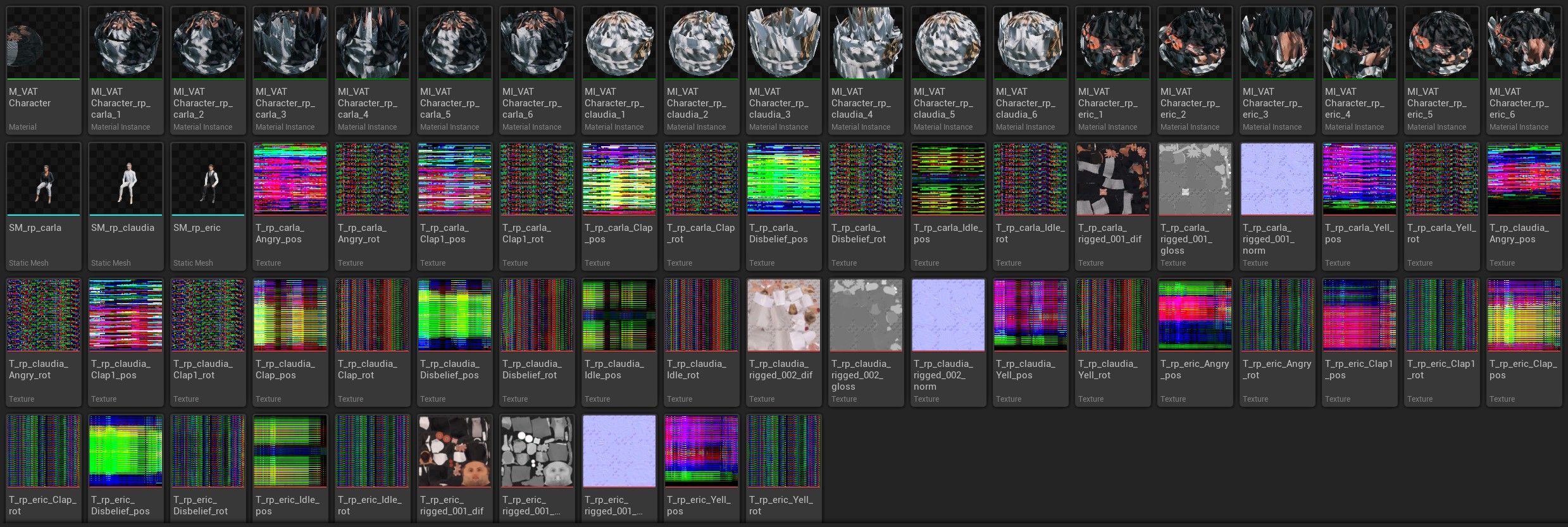
Each character in the VAT workflow produces several asset types, and each type needs slightly different import settings.
In this test setup, each character has 6 animations, which means 6 Material Instances per character.
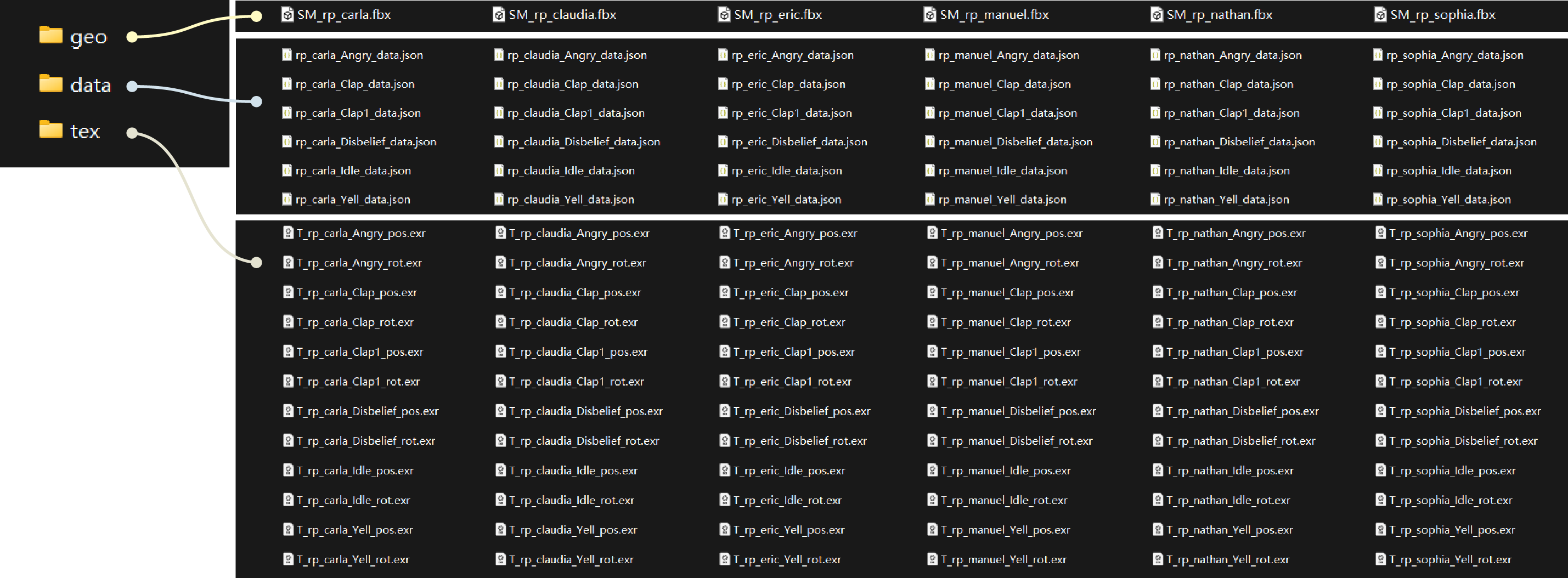
For one character with 6 animations, the manual setup is already tedious.
At crowd scale, it becomes slow, repetitive, and easy to misconfigure:

The Solution
I built this as a hybrid import tool: an Editor Utility Widget for the UI, with Python doing the file discovery and import work.
It connects my Houdini VAT export to the Unreal import path, reducing a roughly 30-minute manual setup to a 10-second automated pass.
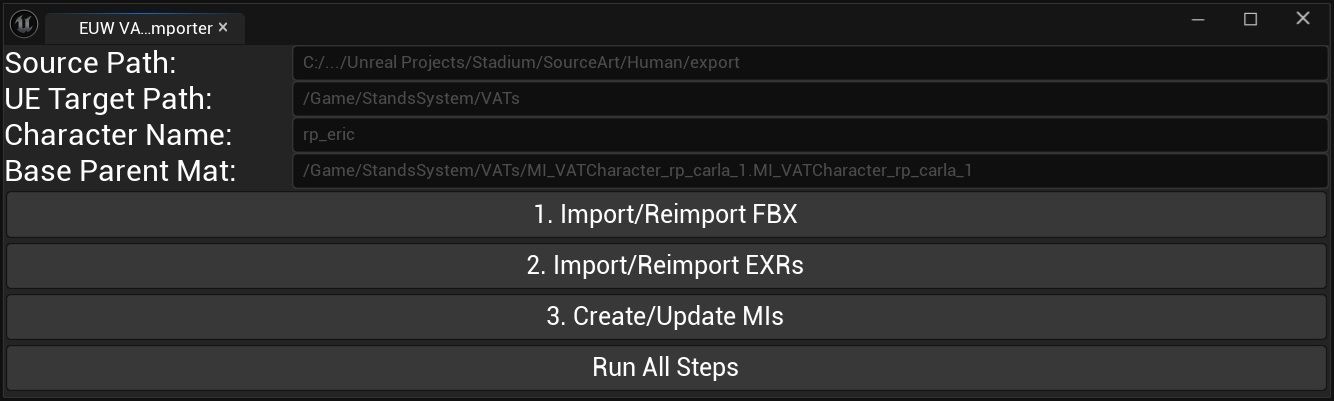
The UI supports both one-click batch import and step-by-step debugging.
I kept the stages visible, from Source -> Target -> Settings -> Execution, so an artist can stop and fix one part without rerunning everything.
Key Capabilities
- Scenario A (Iteration): Artist inputs rp_eric, rp_sophia to update only selected characters.
- Scenario B (Production): Artist leaves the field empty to process the full crowd set.
Code Snippets
Extensibility
I wanted new characters and animations to work without touching the importer code.
The tool derives character identity through regex parsing instead of a hardcoded list.
def _extract_character_name(filename):
  """
  Keep the importer data-driven: new files should be enough.
  """
  name = os.path.splitext(filename)[0]
  # Strip common UE/Houdini prefixes before matching the payload.
  name = re.sub(r'^(SM_|T_|MI_|M_)', '', name, flags=re.IGNORECASE)

  # Example: T_rp_eric_Angry_pos -> rp_eric
  match = re.match(r'^(.+?)_([A-Za-z]+[0-9]*)_(pos|rot|data)$', name)

  return match.group(1) if match else name
The importer leans on the naming convention exported by the Houdini VAT pipeline.
When a new character like rp_newHero appears in the source folder, the tool extracts the character key and pairs it with the matching animations and textures.
Core Feature: Smart Material Architecture
Instead of creating isolated Material Instances, the tool builds a small inheritance tree.
Master settings propagate to every character, while character-specific bounds stay isolated at the base instance level.
# During MI creation for each character's animation set.
for idx, anim_name in enumerate(animations, start=1):

  # First MI owns the character-level data; later MIs inherit it.
  if idx == 1:
      parent_mat = base_parent_material
  else:
      parent_mat = first_mi

  # ... create MI asset ...

  # Enable once. The rest inherit the switch.
  if idx == 1:
      _set_MI_static_switch_parm(mi_asset, "Support Legacy Parameters...", True)
Material Instance Hierarchy
Critical Fix: Post-Import Enforcement
def _build_exr_import_task(exr_file_path, ue_target_path):
  task = _initialize_task(exr_file_path, ue_target_path)
  texture_factory = unreal.TextureFactory()

  # VAT textures carry data, not color.
  texture_factory.set_editor_property('mip_gen_settings', unreal.TextureMipGenSettings.TMGS_NO_MIPMAPS)
  texture_factory.set_editor_property('lod_group', unreal.TextureGroup.TEXTUREGROUP_16_BIT_DATA)
  texture_factory.set_editor_property('compression_settings', unreal.TextureCompressionSettings.TC_HDR)

  task.set_editor_property('factory', texture_factory)
  return task
The most common failure mode in a VAT import is incorrect texture settings.
In practice, Unreal’s Python AssetImportTask did not reliably apply compression_settings during the initial import pass.
def _apply_exr_settings_to_texture(texture_asset):
  """
  Second pass after import. ImportTask misses some texture flags.
  """
  try:
      texture_asset.set_editor_property('compression_settings', unreal.TextureCompressionSettings.TC_HDR)
      texture_asset.set_editor_property('mip_gen_settings', unreal.TextureMipGenSettings.TMGS_NO_MIPMAPS)
      texture_asset.set_editor_property('lod_group', unreal.TextureGroup.TEXTUREGROUP_16_BIT_DATA)
      texture_asset.set_editor_property('srgb', False)
      return True
  except Exception as e:
      _log_error(f"Failed to apply settings to exr: {e}")
      return False
So after import, the tool force-writes the final texture properties instead of trusting the first import pass.
EUW to Python Bridge
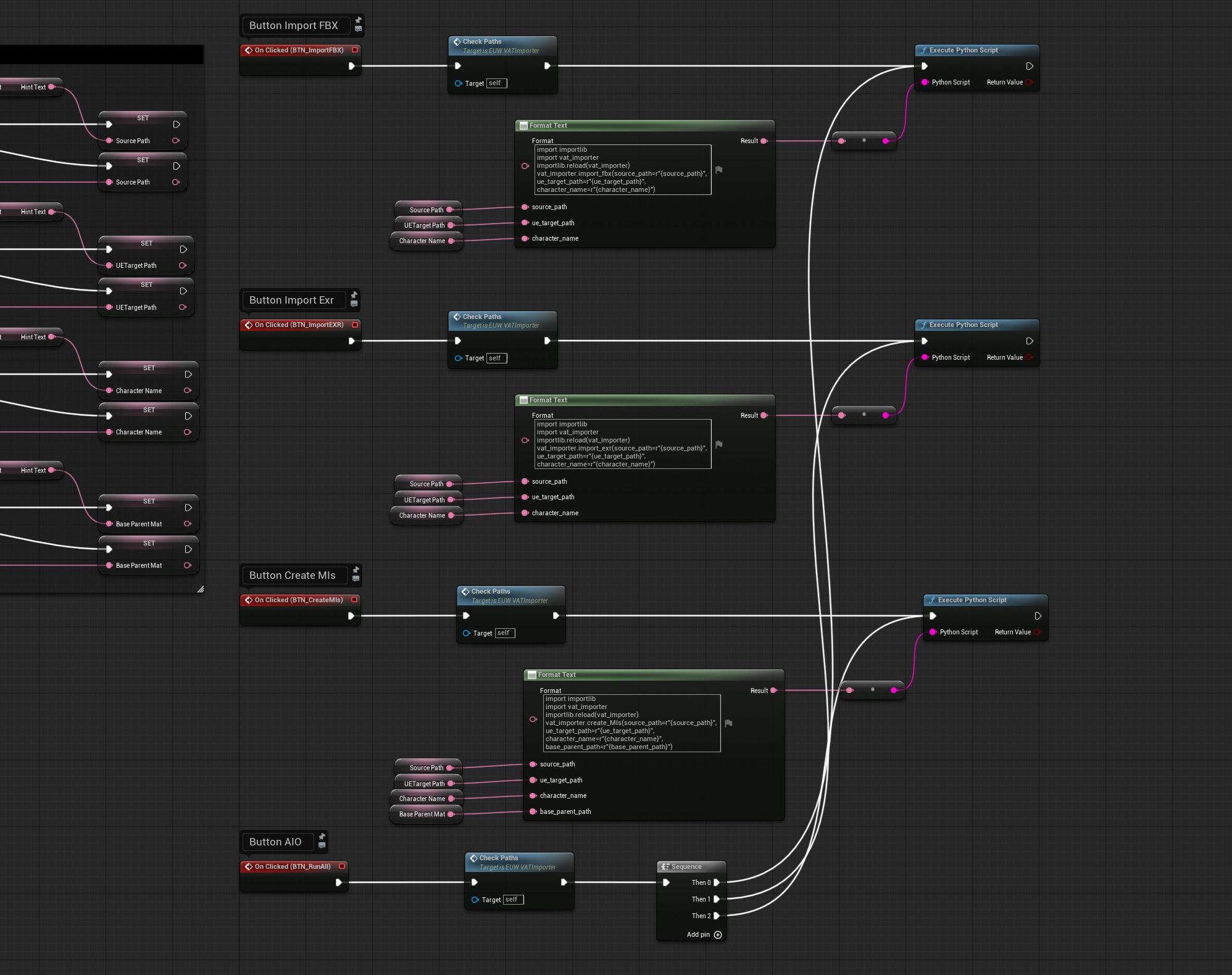
The EUW Blueprint acts as a thin bridge: it formats user input, sanitizes paths and character names, then calls Python through Execute Python Script.
Initial Ver 1.0: Breakdown
The Core Challenge
The assignment was an indoor stadium scene with an optimized, customizable crowd system that could populate stands dynamically.
The initial v1.0 work below came from a 4-day Unreal Engine Technical Artist test assignment.
Requirements:
C++ System Architecture
The runtime system is split across four C++ classes with narrow responsibilities.
That separation keeps the data flow explicit and makes later optimization easier.
Data Flow:
BP_SeatArea (C++) -> BP_SeatManager (C++)
BP_SeatManager (C++) -> BP_CrowdManager (C++)
BP_CrowdVolume (C++) -> BP_CrowdManager (C++)
BP_SeatArea (AASeatSpawnerBase)
BP_SeatArea uses a Spline Component to define a seating region, then generates seat transforms inside that shape.
Multiple actors can be placed to create separate seating groups.
Parameters: Column Spacing · Row Spacing
- Automatic Hookup: Spawners find the Manager on creation; the Manager also notifies existing Spawners when it becomes available.
- Spline-Based Generation: Works with 2D or 3D spline outlines, including concave shapes.

- Automatic Slopes: Interpolates seat height from the spline, so sloped stands can be authored directly in the scene.

- Scanline Fill: Fills the polygon row by row instead of testing every possible point.
- Scale Proof: Actor or spline scaling changes the generated seat count and spacing rather than scaling existing instances.

BP_SeatManager (AAGlobalSeatManager)
BP_SeatManager collects seat transforms from all Spawners and renders the full stadium seating as one HISM.
Parameters: Seat Mesh · Use Debug Mesh · Seat Rotation Offset
- 1 Draw Call: Combines transforms from all BP_SeatArea actors into a single HISM, regardless of Spawner count.

- Automatic Hookup: Registers and unregisters BP_SeatArea actors as they enter or leave the level.
- Debug Mode: Swaps seats for cones to inspect rotation and density without mesh detail.
- Editor QOL: HISM set to bSelectable = false and unexposed UPROPERTY() — prevents editor freeze from selection highlights and Details Panel queries on 100k+ instances.
BP_CrowdVolume (AACrowdVolume)

BP_CrowdVolume defines where crowd characters are allowed to spawn.
Multiple volumes can be layered to create separate crowd sections.
Parameters: Crowd Density · Random Seed
- Live Re-Bake: Moving the volume or changing a property triggers BP_CrowdManager to update the crowd.
- Flexible Filtering: One large volume or many smaller volumes can create different density zones, such as home and away sections.
BP_CrowdManager (AACrowdManager)

BP_CrowdManager fetches seats from BP_SeatManager, filters them through BP_CrowdVolume, then renders the final crowd through a small set of HISM components.
It owns animation variation, material variation, and weighted random selection.
Parameters: Crowd Character Variants · Material Weights · Offset Transform · Bake Crowd
- Dynamic HISM Array: One HISM per animation x mesh variation, e.g. 3 meshes x 6 animations = 18 HISMs.
- Random Animation Start: Uses PerInstanceCustomData to offset animation phase per instance and break synchronization.
- Weighted Animation: Uses weights such as Idle: 100 and Yell: 10, keeping the crowd from looking too uniformly excited.
- Editor QOL: HISM set to bSelectable = false and unexposed UPROPERTY() — prevents editor freeze on 100k+ instances.
Code Snippets
Scanline Fill Algorithm
The seat generator uses a scanline pass to fill spline-defined polygons with evenly spaced seat positions.
static void FindVerticalScanlineIntersections(
  float ScanlineX,
  const TArray& PolygonVertices,
  TArray& OutYIntersections)
{
  // loop over polygon edges: Vi=current, Vj=previous
  {
      // Edge crosses this vertical line.
      if ((Vi.X > ScanlineX) != (Vj.X > ScanlineX))
      {
          float IntersectY = (Vj.Y - Vi.Y) * (ScanlineX - Vi.X)
                           / (Vj.X - Vi.X) + Vi.Y;
          OutYIntersections.Add(IntersectY);
      }
  }
}

// inside GenerateTransforms()
FindVerticalScanlineIntersections(ScanlineX, SplinePoints2D, YIntersections);
YIntersections.Sort();

// Odd-even pairs become valid spans.
for (int32 i = 0; i < YIntersections.Num(); i += 2)
{
  float Y_Enter = YIntersections[i];
  float Y_Exit = YIntersections[i + 1];

  int32 MinCol = FMath::CeilToInt(Y_Enter / ColumnSpacing);
  int32 MaxCol = FMath::FloorToInt(Y_Exit / ColumnSpacing);

  // Emit grid points in this span.
}
The algorithm sorts Y intersections, then applies the odd-even rule to identify valid spans.
A point is inside the polygon if a ray from that point crosses the boundary an odd number of times.
This still handles concave regions, but avoids a brute-force point-in-polygon test for every candidate seat.
Editor QOL: Fix the Selection Freeze
Selecting an actor with hundreds of thousands of instances can freeze the Unreal Editor for more than 10 seconds.
This lag comes from two sources:
selection outline rendering and Details Panel queries.
I addressed both by changing UPROPERTY exposure in the header and component flags in C++.
// Keep the Details Panel away from the component array.
UPROPERTY()
TArray CrowdHISMs;
This keeps the Details Panel from walking every HISM component and poking through large instance buffers.
UHierarchicalInstancedStaticMeshComponent* NewHISM;
// ... HISM setup ...
NewHISM->bSelectable = false;
bSelectable = false disables selection outlines for those instance components.
That avoids the GPU / Render Thread spike caused by drawing outlines over 100,000+ instances.
Reactive Feedback
For authoring, the volumes need quick feedback, but rebaking on every mouse move is too expensive.
So I use PostEditMove() and PostEditChangeProperty() to trigger updates only when they are useful.
virtual void PostEditMove(bool bFinished) override;
virtual void PostEditChangeProperty(FPropertyChangedEvent& PropertyChangedEvent) override;
These hooks let the system react when the user moves a volume or edits a property in the Details Panel.
void AACrowdVolume::PostEditMove(bool bFinished)
{
  Super::PostEditMove(bFinished);

  if (bFinished && CrowdManager)
  {
      CrowdManager->BakeCrowd();
  }
}

void AACrowdVolume::PostEditChangeProperty(FPropertyChangedEvent& PropertyChangedEvent)
{
  Super::PostEditChangeProperty(PropertyChangedEvent);

  if (PropertyChangedEvent.ChangeType == EPropertyChangeType::Interactive) return;

  if (CrowdManager)
  {
      CrowdManager->BakeCrowd();
  }
}
PostEditMove() only rebakes after the transform edit finishes.
PostEditChangeProperty() skips Interactive changes, so slider dragging stays responsive and the bake runs after release.
Performance & Optimization
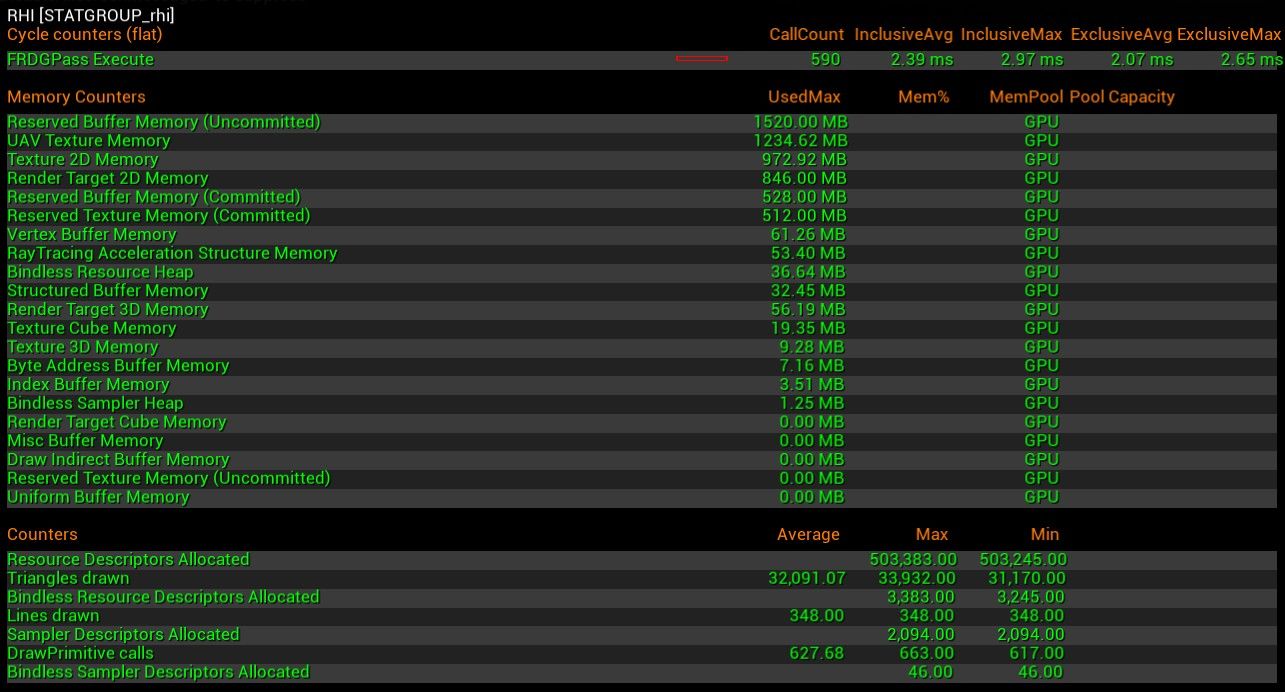
Key Metrics (RHI)
CPU (Draw Calls)
CPU (Game Thread)
GPU
Pipeline
The project is not only runtime code; it also includes the asset path that feeds it.

Procedural Stadium Builder
The stadium environment was generated procedurally in Houdini.
The layout can scale from a small field to a large stadium while preserving modular structure.
The final assets are baked into Unreal through Houdini Engine as modular Instanced Static Mesh components.
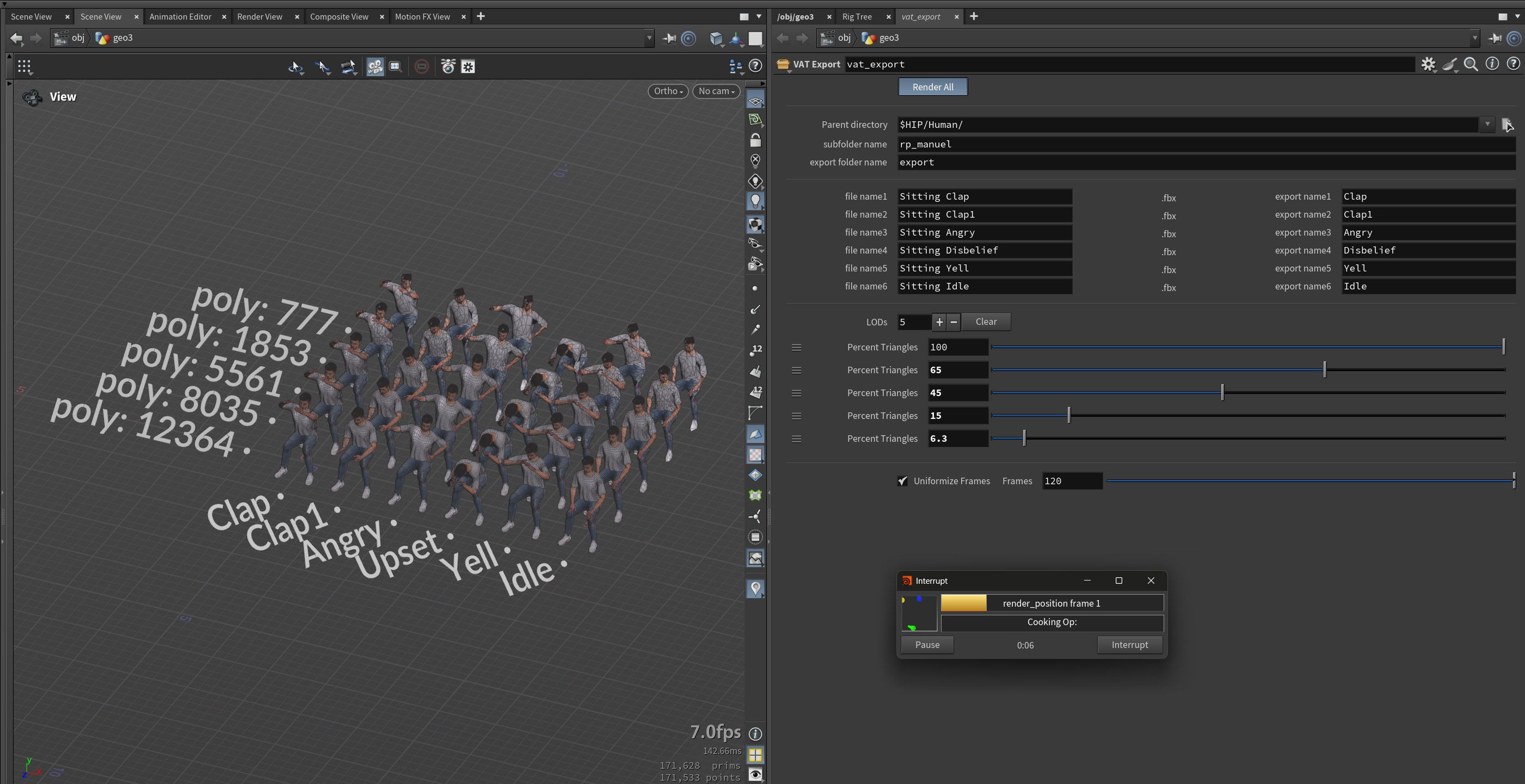
Automated One-Click VAT Export Pipeline
A one-click Houdini export pass generates all character and animation permutations.
When I add a new character or animation, the matching VAT files are generated in the same pass.
Each character and VAT export uses matching LOD reduction rates.